

You’re paying €28.86/month for 10TB on a Hetzner Storage Box, it’s affordable, easy to access, and does a solid job keeping your backups safe.
But let’s talk about the part nobody likes to think about: what happens when things go sideways?
What if Hetzner has a prolonged outage? What if compliance rules suddenly require geographic redundancy? What if you actually need that 99.999999999% durability, the famous eleven nines enterprise systems are built around?
The move isn’t to ditch Hetzner’s great price-to-performance. It’s to add a second layer using Amazon S3 Glacier Deep Archive at roughly $1/TB/month, giving you ultra-durable, geo-replicated archival storage for the long haul.
The real challenge? Moving your data from point A (Hetzner) to point B (AWS) in a way that’s efficient, incremental, and fully automated… without turning the whole thing into a costly, complex mess.
That’s where automation starts paying for itself, in both euros and peace of mind.
The Motive: Why This Matters
Modern backup strategies run into a weird trade-off. Affordable storage, like ~€2.89/TB/month for 10TB on a Hetzner Storage Box, works great for active data, but it doesn’t give you the enterprise-grade durability or geographic redundancy you need for real disaster recovery.
On the flip side, that eleven-nines durability is available… but paying ~$23/TB/month for Amazon S3 Standard can quickly turn your backup bill into something bigger than your production costs.
The sweet spot is hybrid tiering: keep hot data on affordable storage, and push cold backups into ultra-cheap archival storage.
Why Not Manual Backups?
Manual backups tend to fall apart for three simple reasons:
- Human error - eventually, you will forget.
- Bandwidth waste - re-uploading unchanged files eats both time and money.
- No state tracking - without knowing what’s already uploaded, you can’t resume failed transfers or skip duplicates.
The Streaming Advantage
Most backup tools take the scenic route: download files locally first, then upload them to the destination. That creates three avoidable problems:
- Disk space - you need local storage as large as your biggest backup
- Time - you’re doing two transfers instead of one
- Cost - large-disk VMs aren’t cheap
Streaming directly from SFTP (in this case) to S3 removes all three: no local disk needed, a single transfer path, and the whole thing can run on even the smallest VM.
The Architecture
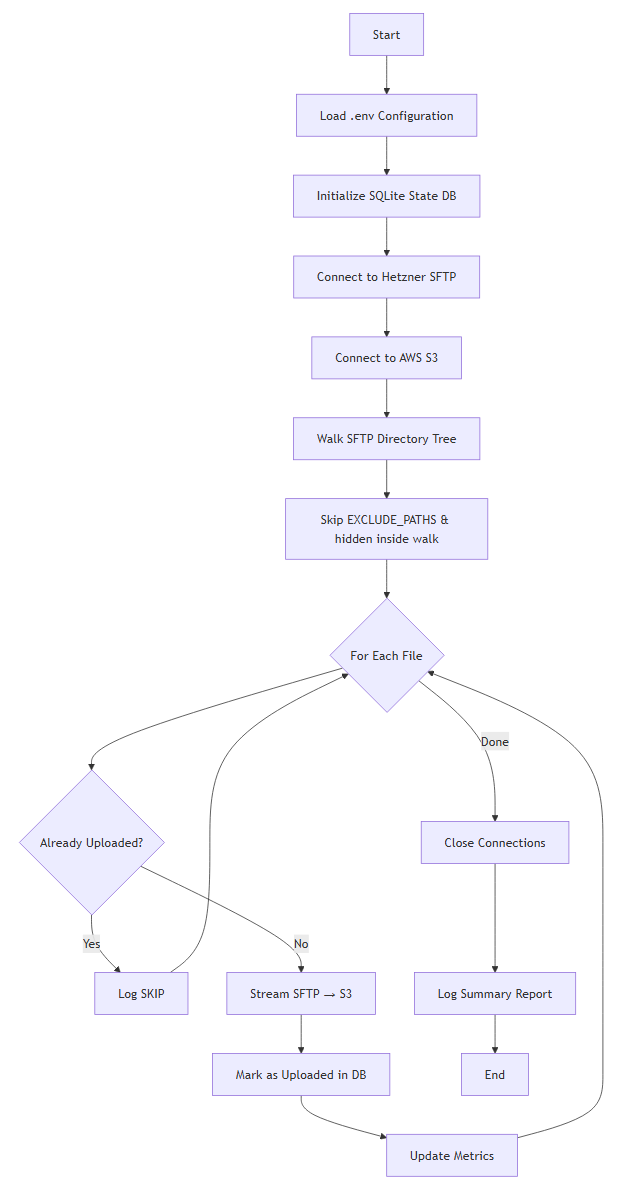
The Python script you will build sets up a direct pipeline from your Hetzner Storage Box straight into Amazon S3 Glacier Deep Archive, no staging, no local copies, no unnecessary moving parts.
System Flow
Requirements & Dependencies
The script runs on Python 3.7+ and relies on four core libraries:
boto3- the AWS SDK for Python, handling authentication, streaming uploads, and automatic multipart transfers for large filesparamiko- a pure-Python SSH/SFTP implementation for secure access to your Storage Boxtqdm- provides real-time progress bars with transfer speeds and ETApython-dotenv- loads environment variables from.envfiles to keep credentials out of your codebase
On top of that, it uses a few built-in modules:
sqlite3for lightweight state tracking (no external DB required)loggingfor console + file outputos,stat,timefor file handling and system utilities
Access Setup
The pipeline needs two things configured outside the script:
Hetzner Storage Box - SFTP access:
- The Storage Box must have SFTP access enabled and configured in the Hetzner Robot / Cloud Console.
- You need the SFTP host (e.g.
u123456.your-storagebox.de), port (usually 23), and a user/password that can read the directories you want to back up. - Without SFTP enabled, the script cannot connect to the Storage Box.
If you still need to get data onto the Storage Box in the first place (local → Hetzner), see Build Your Own Low-Cost Cloud Backup with Hetzner Storage Boxes.
AWS - access keys for S3:
- Create an IAM user (or use an existing one) with permission to write to your target S3 bucket (e.g.
s3:PutObjecton that bucket). - Generate access keys for that user and put
AWS_ACCESS_KEY_IDandAWS_SECRET_ACCESS_KEYin your.env. - The script uses these to authenticate with S3; no keys means uploads will fail.
The Code
You can find the complete implementation on GitHub, but here are the core building blocks that make this pipeline from Hetzner to Amazon S3 Glacier Deep Archive actually work in practice.
System Components Overview
The script is structured around five key layers that work together:
- Configuration Layer - pulls in credentials and runtime settings from a
.envfile - State Persistence Layer - uses SQLite to track which files have already been uploaded
- SFTP Discovery Engine - recursively walks your Storage Box directory tree
- Streaming Transfer Engine - streams files directly from SFTP to S3
- Main Orchestration Loop - ties everything together and manages execution flow
Let’s break down each piece with code snippets and more importantly, why it’s built this way.
Configuration Loading
from dotenv import load_dotenv
load_dotenv()

HETZNER_HOST = os.getenv("HETZNER_HOST")
HETZNER_USER = os.getenv("HETZNER_USER")
HETZNER_PASSWORD = os.getenv("HETZNER_PASSWORD")
REMOTE_PATH = os.getenv("REMOTE_PATH")

S3_BUCKET = os.getenv("S3_BUCKET")
S3_PREFIX = os.getenv("S3_PREFIX")
AWS_REGION = os.getenv("AWS_REGION")
AWS_ACCESS_KEY_ID = os.getenv("AWS_ACCESS_KEY_ID")
AWS_SECRET_ACCESS_KEY = os.getenv("AWS_SECRET_ACCESS_KEY")

STATE_DB = os.getenv("STATE_DB", "archive_state.db")
LOG_FILE = os.getenv("LOG_FILE", "archive.log")
# Comma-separated paths to exclude (that path and everything under it)
EXCLUDE_PATHS_RAW = os.getenv("EXCLUDE_PATHS", os.getenv("EXCLUDE_DIRS", ""))
EXCLUDE_PATHS = [p.strip().strip("/") for p in EXCLUDE_PATHS_RAW.split(",") if p.strip()]
All secrets and runtime settings are stored in a .env file and loaded at start-up using python-dotenv. This keeps credentials (for Hetzner and AWS), bucket details, remote paths, logging config, and optional exclusions outside of your actual codebase.
Keeping configuration separate from code is one of those boring best practices that quietly saves you from very real disasters. Loading environment variables at runtime lets you:
- Avoid committing secrets to version control
- Run the same code across dev, staging, and production with different configs
- Rotate credentials without redeploying code
- Open-source the project without leaking access keys
If you want to level up config and validation in Python (typed settings, env validation, APIs), check out Practical Pydantic.
State Database Initialization
def init_db():
    conn = sqlite3.connect(STATE_DB)
    conn.execute("""
        CREATE TABLE IF NOT EXISTS files (
            path TEXT PRIMARY KEY,
            size INTEGER,
            mtime INTEGER,
            uploaded_at INTEGER
        )
    """)
    conn.commit()
    return conn
A local SQLite database keeps track of every file that’s already been archived using a simple fingerprint: (path, size, mtime). For each upload, it records the file path (as the primary key), its size in bytes, last modified timestamp, and when it was successfully transferred.
If the script stops midway, or you run it again later, it immediately knows what’s already been handled and what still needs attention.
SQLite gives you a zero-config database with no server to install or maintain. The schema is intentionally minimal:
pathas the PRIMARY KEY guarantees uniqueness and fast lookupssize+mtimeact as a reliable change detectoruploaded_atgives you an audit trail for debugging or reporting
Using CREATE TABLE IF NOT EXISTS also makes the process idempotent, meaning you can run it repeatedly without errors, duplicate uploads, or wasted bandwidth. Just clean, incremental backups every time.
Smart Duplicate Detection
def already_uploaded(conn, path, size, mtime):
    row = conn.execute(
        "SELECT size, mtime FROM files WHERE path=?",
        (path,)
    ).fetchone()
    return row == (size, mtime)
This function checks the state database to see whether a file with the same path, size, and last modification time has already been uploaded, allowing the script to intelligently skip anything that hasn’t changed.
That one-line tuple comparison, row == (size, mtime), quietly handles all the important cases:
- If the path isn’t in the database →
None == (size, mtime)→False→ upload it - If the path exists but size or
mtimechanged →(old_size, old_mtime) == (new_size, new_mtime)→False→ upload it - If the path exists with identical size and
mtime→True→ skip it
This makes incremental backups dramatically more efficient. After the initial full run, future executions may end up skipping the vast majority of files. Since the database is updated after each successful transfer, the process is also interruption-safe, if something stops halfway through, it simply resumes where it left off.
State Persistence After Upload
def mark_uploaded(conn, path, size, mtime):
    conn.execute(
        "REPLACE INTO files VALUES (?, ?, ?, ?)",
        (path, size, mtime, int(time.time()))
    )
    conn.commit()
After a file is successfully uploaded, this function stores its metadata in the state database, creating a persistent record that prevents the same unchanged file from being transferred again in future runs.
Using REPLACE instead of a plain INSERT neatly covers both scenarios:
- If the file path already exists → update the existing record
- If it doesn’t → insert a new one
The immediate commit() is what makes this reliable. If the script crashes right after this step, the upload is already recorded, so the next run won’t waste time or bandwidth reprocessing it.
This gives you interruption safety at the file level. Each commit is atomic: you either have a fully written record, or nothing at all. No half-finished states, no ambiguity.
SFTP Directory Walker with Path Exclusions
This article is for subscribers only
To continue reading this article, just register your email and we will send you access.
Subscribe NowAlready have an account? Sign In