
Django Context Processors vs Middleware - When to Use Each
Open base.html in a project you already have running. Somewhere near the top there is a greeting, {{ user.username }}, and somewhere else a loop over messages.
Search the views. The about page never passes user. The product page never passes messages. Both templates still render the logged-in person and the message from the last form.
Django ran a few small functions while it was building the template context, and each function handed back a dictionary. That is a context processor. You have been using them since the first template that mentioned user.
A function that takes the request
A context processor in Django is a Python function with one argument, the current HttpRequest, and one return value, a dictionary. Django merges that dictionary into the context of a template rendered with the request.
The auth processor is the one that makes {{ user }} work. Stripped to the idea, it reads the user that authentication middleware already attached to the request, and returns it under a name the template can use:
def auth(request):
    # Simplified version, not the actual auth context processor
    return {
        "user": request.user,
    }
The real function in django.contrib.auth.context_processors also supplies perms, and it falls back to an AnonymousUser when the request has no user.
Django calls these functions when a template is rendered. render(request, template, context) and TemplateResponse both build a RequestContext, and that context runs the processors.
A plain Context skips them. Render with Context({"title": "About"}) and no request, and {{ user }} is empty, in a project that has the auth processor configured.
The view can still pass its own dictionary. The processor fills in the variables that should be there no matter which view ran.
The ones a new project already has
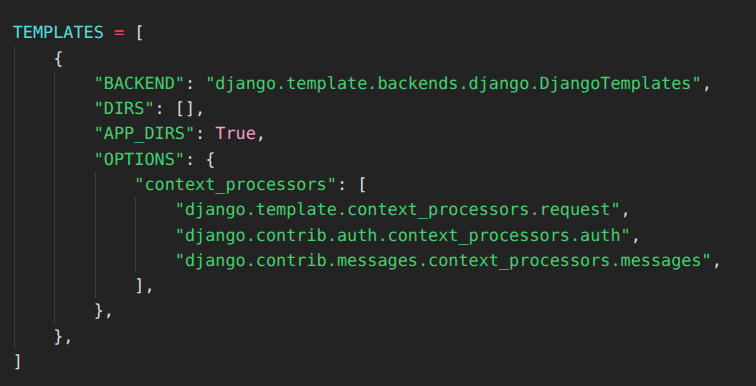
A project created with startproject lists three processors in TEMPLATES:
TEMPLATES = [
    {
        "BACKEND": "django.template.backends.django.DjangoTemplates",
        "DIRS": [],
        "APP_DIRS": True,
        "OPTIONS": {
            "context_processors": [
                "django.template.context_processors.request",
                "django.contrib.auth.context_processors.auth",
                "django.contrib.messages.context_processors.messages",
            ],
        },
    },
]
Each entry is a dotted path to a function. Django imports that path. A typo here fails when the template engine loads, which is earlier and louder than a missing variable in one page.
What they add:
requestputs theHttpRequestinto the context, so{{ request.path }}works.authaddsuserandperms.messagesaddsmessagesandDEFAULT_MESSAGE_LEVELS, which is why{% if messages %}works in the base template.
How to Manage Feature Flags in Django Applications with Django-Flags adds that same request processor, so the template can see request.
RequestContext also always enables django.template.context_processors.csrf, even though that path is absent from the list. It stays on so {% csrf_token %} can see a token, and that setting cannot be turned off.
Older projects often include django.template.context_processors.debug as well. That one adds debug and sql_queries, and only when DEBUG is true and the client IP is in INTERNAL_IPS.
Processors run in list order. If two of them return the same key, the later one wins.
Add the cart count once
Picture a shop. The header in base.html should show how many items are in the cart.
The cart lives in the session, under product ids and quantities: {"1": 2, "2": 1} means three items. The homepage view can compute that and pass cart_count.
Then you forget to add in the about page, and the header shows nothing. Then a third view copies the same three lines.
After the third copy, stop passing it from the views. That is what context processors are for.
Put the function in the app that owns the cart, in store/context_processors.py:
def cart_count(request):
    cart = request.session.get("cart", {})
    return {"cart_count": sum(cart.values())}
request.session is already loaded, because SessionMiddleware ran before the view. The processor reads that session.
Register it by adding the dotted path to the same list. Leave the defaults in place. Replacing the list would remove user and messages from every template.
"context_processors": [
    "django.template.context_processors.request",
    "django.contrib.auth.context_processors.auth",
    "django.contrib.messages.context_processors.messages",
    "store.context_processors.cart_count",
],
The header can use the variable the way it already uses user:
<p>Hi, {{ user.username }}.</p>
<a href="{% url 'cart' %}">Cart ({{ cart_count }})</a>
A view that renders the about page does not mention the cart:
def about(request):
    return render(request, "about.html", {"title": "About"})
about.html extends base.html. During render(), Django calls cart_count, merges {"cart_count": 3} into the context, and the header shows 3. The title from the view is still there.
With render(), the view's dictionary wins a name clash. Avoid the names user, request, messages, and perms. A RequestContext you construct by hand is the exception: a processor can overwrite keys you passed into the constructor. render() and TemplateResponse push the view's dictionary on afterwards.
An API view that returns JsonResponse never builds a RequestContext, so cart_count never runs for that request. A redirect or a file download skips it too.
A unit test can call the function without rendering a template. RequestFactory builds a request without session middleware, and this processor only calls .get on whatever object sits at request.session, so a dict stands in for the session:
from django.test import RequestFactory
from store.context_processors import cart_count


def test_cart_count_sums_quantities():
    request = RequestFactory().get("/")
    request.session = {"cart": {"1": 2, "2": 1}}
    assert cart_count(request) == {"cart_count": 3}
When it is the right place
Use a context processor when the variable shows up in a shared template, usually base.html or an include that many pages pull in.
The value comes from the request: the user, the session, a header, the path. Computing it is cheap, or it stays lazy until the template actually reads it.
A queryset assigned in the dictionary is still lazy. Category here is only an illustration. This version does not hit the database until a template loops over nav_categories:
from store.models import Category


def navigation(request):
    return {
        "nav_categories": Category.objects.filter(in_nav=True),
    }
Django calls navigation on every render(), including the about page, whose template never mentions nav_categories.
filter() only builds the queryset. Django puts that object in the context, and the query waits. The SQL runs if a template loops over nav_categories. The about page never mentions the variable, so that query never runs.
list(queryset) and queryset.count() send the SQL while navigation is still running. So does a dictionary you fill in the function, by looping over the categories and copying out names and urls.
That work is done when the function returns. Every render() pays for it, including pages that never print the result.
If that cost is high and only a few pages need the value, pass it from those views.
The about page's title belongs in the about view. A processor for it would also run on the cart page, the homepage, and every other render() call, to fill a variable a single template reads.
Tracking YouTube Video Watch Progress with Django does the same with video_id and progress. The video_detail view passes both, because only that page needs them.
Where middleware starts
Middleware and context processors are both dotted paths in settings, and both receive the request.
Take the same request for the about page.
Middleware runs first, on the way in. SessionMiddleware loads the session. AuthenticationMiddleware sets request.user. Middleware may also return a response immediately and skip the view, or change the response on the way out: a header, a cookie, a redirect.
The view runs next. about calls render().
Context processors run inside that render(), after middleware has prepared the request and before the HTML goes back out.
Then middleware runs again, on the way out, and sees the HttpResponse the view returned.
The messages framework uses both. MessageMiddleware attaches the message storage to the request and writes it onto the response on the way out. The messages context processor reads that storage and exposes it as messages.
Drop the processor, and a view can still call messages.success(), while {% for message in messages %} in the template renders nothing.
You could compute the cart count in middleware and hang it on the request. The class would live in store/middleware.py:
class CartCountMiddleware:
    def __init__(self, get_response):
        self.get_response = get_response

    def __call__(self, request):
        cart = request.session.get("cart", {})
        request.cart_count = sum(cart.values())
        return self.get_response(request)
Placing it after SessionMiddleware, so request.session exists:
MIDDLEWARE = [
    # ...
    "django.contrib.sessions.middleware.SessionMiddleware",
    "store.middleware.CartCountMiddleware",
    # ...
]
It then runs for every request that reaches Django, including the JSON endpoint that never renders a template.
The header still has no {{ cart_count }}, because this class set an attribute on the request. With the request processor enabled, the template can read {{ request.cart_count }}. Leave that processor out, and the template has no path to the attribute.
A redirect is the kind of job The Importance of Django Middleware gives this layer. If a signed-in user has not accepted the current terms, that middleware sends them to the acceptance page before the view runs. A context processor never sees that choice. It runs only if a template is rendered.
The next time a header variable is missing on one page and present on another, open the context_processors list before you copy the queryset into a second view.
Conclusion
{{ user }} is in every template because a context processor returns it.
A variable of your own follows the same path: a function that takes the request, a dictionary, and a dotted path in TEMPLATES.
Leave a value in the view when one page needs it.
Put it in a context processor when a shared template needs it and the work stays cheap, or waits until the template reads it.
Put it in middleware when it has to happen before the view runs, or when the request or the response has to change for HTML and JSON alike.
Follow me on Twitter: https://twitter.com/DevAsService
Follow me on Instagram: https://www.instagram.com/devasservice/
Follow me on TikTok: https://www.tiktok.com/@devasservice/
Follow me on YouTube: https://www.youtube.com/@DevAsService



Comments ()