Tracking YouTube Video Watch Progress with Django
Your Django app serves a YouTube video. The page loads, the player appears, and your database records nothing. You have no idea whether the user pressed play, watched ten seconds, or finished the whole thing.
That gap matters. For an e-learning course, a gated module, or any feature that requires users to actually consume content, "the page loaded" is the wrong signal. You need to know how much of the video they watched, not where the scrubber sits right now, but the furthest point they have ever reached.
The YouTube IFrame Player API exposes playback position, duration, and state changes from JavaScript. Combined with a small Django backend, that is enough to track the maximum percentage each user has reached on each video and persist it per user.
This article walks through a videos app: one model, two views for tracking, one template with embedded JavaScript, and Django's built-in auth to tie saves to request.user.
A working demo is in the companion repository at github.com/nunombispo/youtube-video-player-article, clone it to follow along.
Architecture
Five logical components make up the system. The diagram shows what each one owns and which boundaries it crosses:
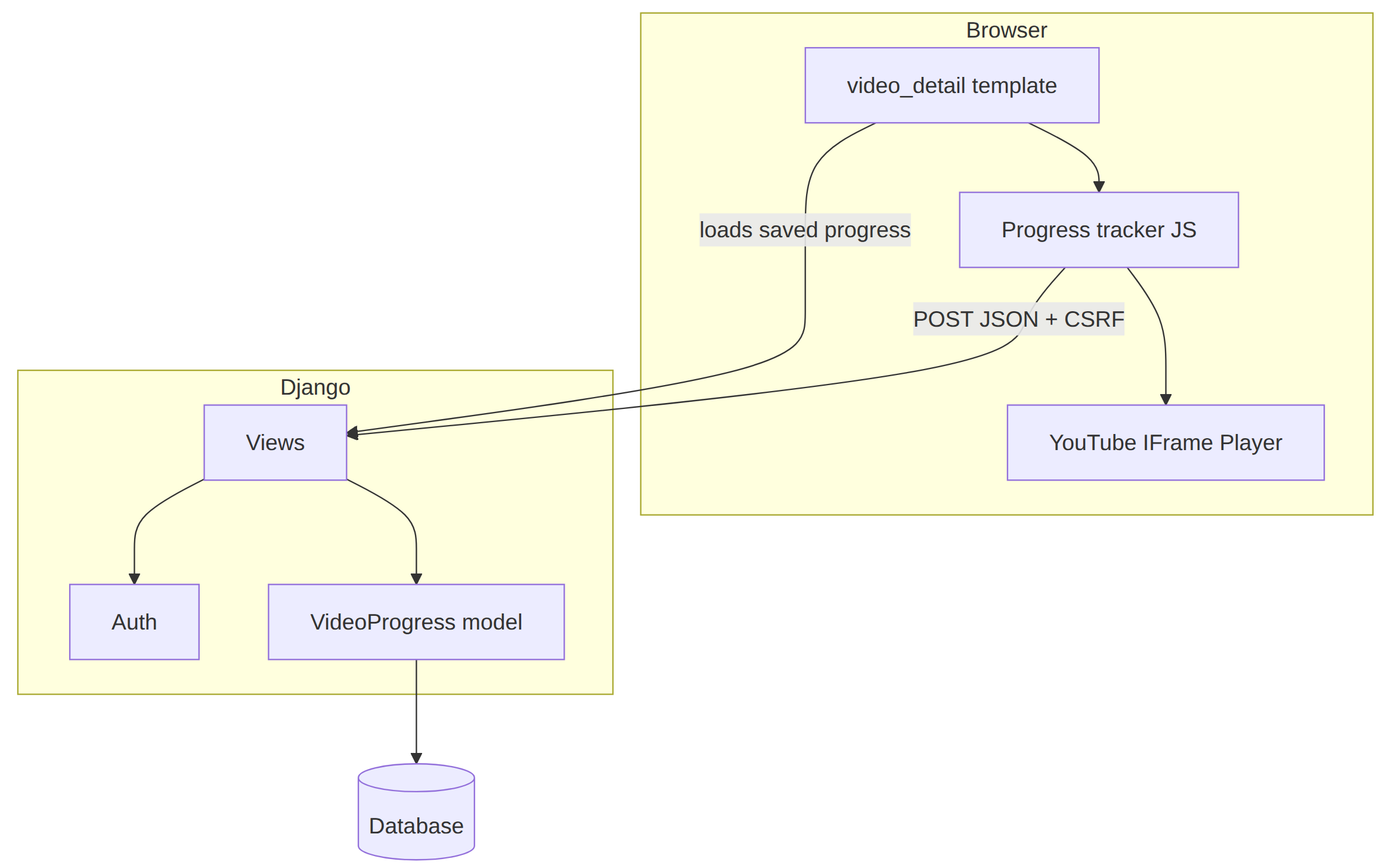
video_detail template - Django renders the page with the video ID from the URL and any stored progress for the current user. It owns the HTML structure: the player mount point, the progress bar, the CSRF token, and the script tags that load the IFrame API.
Progress tracker (JavaScript) - Runs in the browser after the template loads. It reads playback state from the YouTube player, maintains maxPercentage locally, updates the progress bar, and POSTs to Django when the value increases. It never talks to the database directly; every persist goes through the view.
YouTube IFrame Player - An external embed controlled through the IFrame Player API. It supplies getCurrentTime(), getDuration(), and onStateChange events. The tracker depends on it but does not own it, swap the video ID and the same tracker code works for any YouTube video.
Views - video_detail serves the page and queries existing progress on GET. update_progress receives JSON POSTs and writes to the model. @login_required on the update view ties each save to request.user through Django auth. The view is the trust boundary: it validates input and enforces the rule that stored progress only moves forward.
VideoProgress model - One row per (user, video_id) pair. Stores max_percentage and updated_at. The view reads it when rendering the page and writes it on each accepted POST.
Data model
Progress tracking needs one persistent fact per user per video: the highest percentage ever reached. A single model holds that.
unique_together on user and video_id enforces one row per pair. Without it, repeated saves could create duplicate rows for the same user watching the same video. video_id is a CharField, YouTube IDs are 11 characters, but 20 leaves room for other providers if you adapt the code later.
from django.contrib.auth import get_user_model
from django.db import models
User = get_user_model()
class VideoProgress(models.Model):
user = models.ForeignKey(User, on_delete=models.CASCADE)
video_id = models.CharField(max_length=20)
max_percentage = models.PositiveIntegerField(default=0)
updated_at = models.DateTimeField(auto_now=True)
class Meta:
unique_together = ('user', 'video_id')
max_percentage only ever increases, in JavaScript on the client and again in the view on the server. The double guard handles out-of-order requests: a slow POST from 40% must not overwrite a record already at 60%. updated_at refreshes on every save via auto_now=True, which gives you a last-activity timestamp without extra view code.
Register the model in admin.py to inspect records during development:
from django.contrib import admin
from .models import VideoProgress
admin.site.register(VideoProgress)
Add 'videos' to INSTALLED_APPS in settings.py, then run makemigrations and migrate.
The model is persistence only. Next, connect it to a page the user actually loads.
Template
video_detail.html extends a shared base.html that loads Bootstrap 5 from a CDN. Layout and styling are incidental to tracking, what matters is how the template passes data from Django into the player and the JavaScript tracker.
The HTML snippets below show the tracking-relevant markup only; the demo repository wraps them in Bootstrap cards and columns.
The template expects two context variables: video_id from the URL and progress from the database. The video_detail view supplies both, which we will cover in the Views section below.
Player mount and CSRF: The player div carries the video ID as a data attribute. Django fills {{ video_id }} from the URL; JavaScript reads dataset.videoId without mixing template tags into the script logic.
{% csrf_token %}
<div class="ratio ratio-16x9 bg-dark">
<div id="player" data-video-id="{{ video_id }}"></div>
</div>
{% csrf_token %} renders a hidden input and ensures the csrftoken cookie is available. Django's CsrfViewMiddleware expects that cookie value back in the X-CSRFToken header on POST requests. Include the tag on any page that POSTs via fetch().
Seeding client state: When a user returns to a video they have partially watched, maxPercentage must start at the stored value, not zero. Otherwise a replay followed by an early tab close would under-report progress. The repo seeds maxPercentage, videoId, isAuthenticated, and updateProgressUrl at the top of a single {% block extra_js %} script, together with the IFrame API tag and the full tracker, see the JavaScript section below.
isAuthenticated lets the tracker skip POSTs for anonymous users. updateProgressUrl uses {% url %} so the path stays correct if you change URL patterns.
Progress bar: The bar renders from the same context on first load. JavaScript updates width and label as playback advances, so the user sees progress move without refreshing.
<div class="progress" style="height: 1.25rem;">
<div class="progress-bar bg-danger"
id="progress-bar"
role="progressbar"
style="width: {{ progress.max_percentage|default:0 }}%"
aria-valuenow="{{ progress.max_percentage|default:0 }}"
aria-valuemin="0"
aria-valuemax="100">
</div>
</div>
<span class="badge" id="progress-label">{{ progress.max_percentage|default:0 }}%</span>
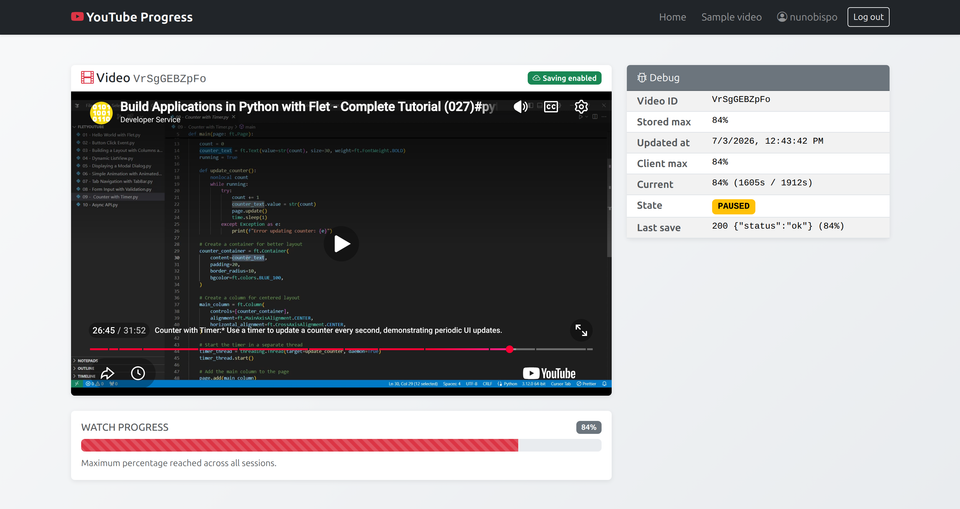
Debug panel: A sidebar table shows server-stored values alongside live client state: current position, player state, and the last POST response. Remove it in production; it saves time while wiring up the tracking logic and confirming saves land without a page refresh.
<!-- Remove in production -->
<table class="table table-sm table-striped mb-0">
<tbody>
<tr>
<th scope="row">Video ID</th>
<td id="debug-video-id">{{ video_id }}</td>
</tr>
<tr>
<th scope="row">Stored max</th>
<td id="debug-stored-max">{{ progress.max_percentage|default:0 }}%</td>
</tr>
<tr>
<th scope="row">Updated at</th>
<td id="debug-stored-updated">{% if progress %}{{ progress.updated_at }}{% else %}—{% endif %}</td>
</tr>
<tr>
<th scope="row">Client max</th>
<td id="debug-client-max">{{ progress.max_percentage|default:0 }}%</td>
</tr>
<tr>
<th scope="row">Current</th>
<td id="debug-current">—</td>
</tr>
<tr>
<th scope="row">State</th>
<td><span id="debug-state">—</span></td>
</tr>
<tr>
<th scope="row">Last save</th>
<td id="debug-last-save">—</td>
</tr>
</tbody>
</table>
IFrame API: Load the YouTube script after the player element exists, at the bottom of the template in a {% block extra_js %}:
<script src="https://www.youtube.com/iframe_api"></script>
The API loads asynchronously and calls onYouTubeIframeAPIReady when ready. Placing the script after the div and deferring initialization to that callback avoids YT is not defined errors.
Views
Three views cover the demo. home renders a landing page with a link to a sample video. video_detail and update_progress do the tracking work.
video_detail runs on GET. It looks up any existing VideoProgress row for the authenticated user and passes it to the template along with the video_id from the URL.
from django.shortcuts import render
from .models import VideoProgress
def video_detail(request, video_id):
progress = None
if request.user.is_authenticated:
progress = VideoProgress.objects.filter(
user=request.user, video_id=video_id
).first()
return render(request, 'videos/video_detail.html', {
'video_id': video_id,
'progress': progress,
})
Anonymous users get progress = None; the template seeds maxPercentage to 0. They can still watch the video. Saves are skipped in JavaScript and blocked by @login_required on the update view.
update_progress runs on POST. It parses JSON, validates the payload, and upserts with a monotonic guard.

import json
from django.contrib.auth.decorators import login_required
from django.http import JsonResponse
from django.views.decorators.http import require_POST
from .models import VideoProgress
@login_required
@require_POST
def update_progress(request):
data = json.loads(request.body)
video_id = data.get('video_id', '')
percentage = data.get('percentage', 0)
if not video_id or not isinstance(percentage, (int, float)):
return JsonResponse({'error': 'invalid data'}, status=400)
obj, created = VideoProgress.objects.get_or_create(
user=request.user,
video_id=video_id,
defaults={'max_percentage': percentage},
)
if not created and percentage > obj.max_percentage:
obj.max_percentage = percentage
obj.save()
return JsonResponse({'status': 'ok'})
get_or_create inserts on first visit. The if not created branch updates only when the incoming percentage exceeds what is already stored. The user comes from request.user, the JSON payload carries video_id and percentage only.
Wire the views in videos/urls.py:
from django.urls import path
from . import views
urlpatterns = [
path('', views.home, name='home'),
path('videos/<str:video_id>/', views.video_detail, name='video_detail'),
path('progress/update/', views.update_progress, name='update_progress'),
]
Include that file from config/urls.py:
from django.contrib import admin
from django.urls import include, path
urlpatterns = [
path('admin/', admin.site.urls),
path('accounts/', include('django.contrib.auth.urls')),
path('', include('videos.urls')),
]
Auth: @login_required on update_progress redirects anonymous POSTs to the login page. Wire Django's built-in auth views and point LOGIN_URL at them:
# settings.py
LOGIN_URL = '/accounts/login/'
LOGIN_REDIRECT_URL = '/'
Create a user with createsuperuser (or your existing signup flow) before testing saves. Register VideoProgress in admin.py to inspect records at /admin/.
Open the Network tab and pause the video. You should see POST /progress/update/ with status 200 and {"status": "ok"}. A 403 means the CSRF token is missing, check {% csrf_token %} is on the page and X-CSRFToken is in the request headers. A 302 means @login_required redirected because the user is not authenticated.
JavaScript
The tracker script lives in video_detail.html inside {% block extra_js %}, after the IFrame API script tag. It has four jobs: initialize the player, compute watch percentage, maintain the running maximum, and POST updates to Django.
Declare template-sourced variables and throttle state first, sendProgressToDjango() and maybeSaveProgress() depend on them:
var player;
var maxPercentage = {{ progress.max_percentage|default:0 }};
var videoId = document.getElementById('player').dataset.videoId;
var isAuthenticated = {{ user.is_authenticated|yesno:"true,false" }};
var updateProgressUrl = '{% url "update_progress" %}';
var lastSavedPercentage = maxPercentage;
var lastSaveAttempt = 0;
var SAVE_INTERVAL_MS = 5000;
var STATE_NAMES = {
'-1': 'UNSTARTED',
'0': 'ENDED',
'1': 'PLAYING',
'2': 'PAUSED',
'3': 'BUFFERING',
'5': 'CUED'
};
var STATE_BADGES = {
'-1': 'text-bg-secondary',
'0': 'text-bg-success',
'1': 'text-bg-danger',
'2': 'text-bg-warning',
'3': 'text-bg-info',
'5': 'text-bg-secondary'
};
UI helpers: updateProgressBar() syncs the Bootstrap bar with maxPercentage. updateDebugDisplay() refreshes the debug panel if you kept it, skip both functions if you removed the panel.
function updateProgressBar(percentage) {
var bar = document.getElementById('progress-bar');
var label = document.getElementById('progress-label');
bar.style.width = percentage + '%';
bar.setAttribute('aria-valuenow', percentage);
label.textContent = percentage + '%';
}
function updateDebugDisplay(stateCode) {
var currentPct = player && player.getDuration ? getWatchPercentage() : null;
var duration = player && player.getDuration ? player.getDuration() : null;
var currentTime = player && player.getCurrentTime ? player.getCurrentTime() : null;
document.getElementById('debug-client-max').textContent = maxPercentage + '%';
if (currentPct !== null && duration) {
document.getElementById('debug-current').textContent =
currentPct + '% (' + Math.round(currentTime) + 's / ' + Math.round(duration) + 's)';
}
if (stateCode !== undefined) {
var stateEl = document.getElementById('debug-state');
var name = STATE_NAMES[String(stateCode)] || stateCode;
stateEl.textContent = name;
stateEl.className = 'badge debug-value ' + (STATE_BADGES[String(stateCode)] || 'text-bg-light text-dark');
}
}
Player initialization: YouTube's IFrame API calls onYouTubeIframeAPIReady when the script finishes loading. Create the player therem calling new YT.Player() before this fires raises an error.
function onYouTubeIframeAPIReady() {
player = new YT.Player('player', {
videoId: videoId,
playerVars: {
autoplay: 0,
controls: 1,
rel: 0
},
events: {
onStateChange: onPlayerStateChange
}
});
}
autoplay: 0 leaves playback control with the user. rel: 0 stops YouTube from suggesting unrelated videos when playback ends.
Watch percentage: Divide current time by duration and round. Guard against duration === 0 while the player is still loading, without the guard you get NaN.
function getWatchPercentage() {
var duration = player.getDuration();
if (duration === 0) return 0;
return Math.round((player.getCurrentTime() / duration) * 100);
}
Maximum tracking: Store the highest value reached, not the current scrubber position. If a user watches to 80%, seeks back to 20%, and pauses, the stored value stays 80%.
function recordProgress() {
var pct = getWatchPercentage();
if (pct > maxPercentage) {
maxPercentage = pct;
updateProgressBar(maxPercentage);
maybeSaveProgress();
}
updateDebugDisplay();
}
On ENDED, set maxPercentage to 100 directly. At the end of a video, getCurrentTime() sometimes returns a value slightly below getDuration() due to floating-point timing. Computing the percentage would give 99 instead of 100.
Saving to Django: Read the CSRF cookie and POST JSON to the URL the template provided. On a successful response, update lastSavedPercentage so the throttle in maybeSaveProgress() does not re-send the same value, and refresh the debug panel's stored fields and last-save status.
function getCsrfToken() {
var cookies = document.cookie.split(';');
for (var i = 0; i < cookies.length; i++) {
var cookie = cookies[i].trim();
if (cookie.startsWith('csrftoken=')) {
return cookie.substring('csrftoken='.length);
}
}
return '';
}
function sendProgressToDjango(percentage) {
if (!isAuthenticated) {
document.getElementById('debug-last-save').textContent = 'skipped (not logged in)';
return;
}
fetch(updateProgressUrl, {
method: 'POST',
headers: {
'Content-Type': 'application/json',
'X-CSRFToken': getCsrfToken()
},
body: JSON.stringify({
video_id: videoId,
percentage: percentage
})
}).then(function(response) {
return response.json().then(function(data) {
document.getElementById('debug-last-save').textContent =
response.status + ' ' + JSON.stringify(data) + ' (' + percentage + '%)';
if (response.ok) {
lastSavedPercentage = percentage;
document.getElementById('debug-stored-max').textContent = percentage + '%';
document.getElementById('debug-stored-updated').textContent = new Date().toLocaleString();
updateProgressBar(percentage);
}
});
}).catch(function(err) {
document.getElementById('debug-last-save').textContent = 'error: ' + err;
}).finally(function() {
lastSaveAttempt = Date.now();
});
}
When to save: Three triggers cover normal watching, explicit stops, and tab closes.
While the video plays, a one-second interval calls recordProgress(). When maxPercentage increases, maybeSaveProgress() POSTs at most every five seconds, enough to persist progress during long viewing sessions without flooding the server.
On pause or end, maybeSaveProgress(true) bypasses the throttle and saves immediately if there is unsaved progress.
On tab close, beforeunload records the latest position and POSTs any value not yet saved. Treat that POST as best-effort, browsers often cancel in-flight fetch requests while the page unloads. Pause events and the five-second playback throttle cover most sessions; tab-close is a safety net. For stricter close behavior, navigator.sendBeacon() is an option, but it cannot send the X-CSRFToken header, so you would need a separate CSRF strategy for that endpoint.
function maybeSaveProgress(force) {
if (!isAuthenticated) return;
if (maxPercentage <= lastSavedPercentage) return;
if (!force && Date.now() - lastSaveAttempt < SAVE_INTERVAL_MS) return;
sendProgressToDjango(maxPercentage);
}
function onPlayerStateChange(event) {
updateDebugDisplay(event.data);
if (event.data === YT.PlayerState.PLAYING) {
if (!window.debugInterval) {
window.debugInterval = setInterval(function() {
recordProgress();
updateDebugDisplay(YT.PlayerState.PLAYING);
}, 1000);
}
} else if (window.debugInterval) {
clearInterval(window.debugInterval);
window.debugInterval = null;
}
if (event.data === YT.PlayerState.PAUSED) {
recordProgress();
maybeSaveProgress(true);
} else if (event.data === YT.PlayerState.ENDED) {
maxPercentage = 100;
updateProgressBar(100);
maybeSaveProgress(true);
}
}
window.addEventListener('beforeunload', function() {
recordProgress();
if (maxPercentage > lastSavedPercentage) {
sendProgressToDjango(maxPercentage);
}
});
Buffering edge case: buffering (state 3) can produce a PAUSED event followed by PLAYING when it resolves. A PAUSED event does not always mean the user pressed pause. If spurious saves become a problem, add a short debounce on PAUSED, check that the player is still paused 200ms later before recording.
Replay behavior: when a user replays a video, getCurrentTime() resets to 0 but maxPercentage keeps its previous value. If a user watched 90%, replays, and closes at 10%, you want 90% stored, not 10%. Reset maxPercentage to 0 only if your product logic requires it.
The debug panel updates stored max, client max, current, state, and last save in place after each successful POST, no page refresh required.
Conclusion
The gap at the start of this article, a video on the page and nothing in the database, is closed. The IFrame Player reports playback state. JavaScript maintains maxPercentage across pause, seek, and replay. Django receives POSTs, enforces the monotonic rule on the server, and persists one row per user and video in VideoProgress.

That row is the payoff. max_percentage is queryable anywhere in your project: unlock the next module at 80%, mark a course complete at 100%, or feed analytics without re-embedding the player. The tracking logic stays in one template and one view; the model is small enough to drop into an existing app without restructuring your project.
The companion repository at github.com/nunombispo/youtube-video-player-article runs the full pipeline, clone it if you want a working baseline before adapting the snippets to your own templates and URL layout.
Strip the debug panel before shipping, tune the save interval to match your traffic, and decide whether tab-close persistence needs sendBeacon() with a separate CSRF strategy.
Getting from a working demo to a production course platform is a different problem, deployment, observability, auth hardening. If you want a senior review of that path before launch, see developer-service.blog/work-with-me.
The hard part, knowing how far each user has actually watched, is done.
Follow me on Twitter: https://twitter.com/DevAsService
Follow me on Instagram: https://www.instagram.com/devasservice/
Follow me on TikTok: https://www.tiktok.com/@devasservice
Follow me on YouTube: https://www.youtube.com/@DevAsService
Comments ()