Your Python Tool Needs Persistence - It Doesn't Need a Database Server
At some point, every internal tool, CLI utility, or developer script needs to remember something between runs. A list of environments. A job queue. A cache of API responses. A set of user preferences.
The default response is to reach for a database. Set up SQLite, write a schema, maybe add an ORM. That's fifteen minutes of infrastructure for a problem that might not warrant it, and fifteen minutes that turns into an hour once you factor in migrations, connection handling, and test fixtures.
There's a narrower tool for this class of problem. It's called TinyDB.
What TinyDB Actually Is
TinyDB is a Python library that stores structured data as documents in a plain JSON file. No server process. No connection string. No migration history. The entire database is a file on disk that you can open in a text editor.
It's not a replacement for PostgreSQL. It's not trying to be. But for internal tooling, CLI applications, local configuration storage, and developer utilities - the kind of code your team writes to support the product rather than ship as the product - it covers most persistence needs with a fraction of the operational surface area.
It can be installed it with a single command:
pip install tinydb
No credentials to rotate. No infrastructure to provision. No service to monitor.
The Real Cost of Over-Engineering Internal Tools
Internal tools accumulate infrastructure debt quietly. A script that needed a database gets one. The database needs to live somewhere, so it gets a connection string in the environment config. The connection string needs to be kept out of version control. Now you have secrets management for a tool that three engineers use twice a week.
TinyDB short-circuits that chain. The database is a file. It lives next to the code, or in a known path on the machine that runs it. There is nothing to provision, nothing to rotate, and nothing to monitor.
The tradeoff is real: no concurrency, no transactions, no relational integrity. If two processes write to the same file simultaneously, you will corrupt data. If you need joins, TinyDB is the wrong tool. These are known, documented limitations, not surprises that emerge in production.
The decision is straightforward: if the data fits in a file a human could read, and a single process owns the writes, TinyDB is appropriate. If either of those conditions doesn't hold, use something else.
A Concrete Example: CLI Task Manager
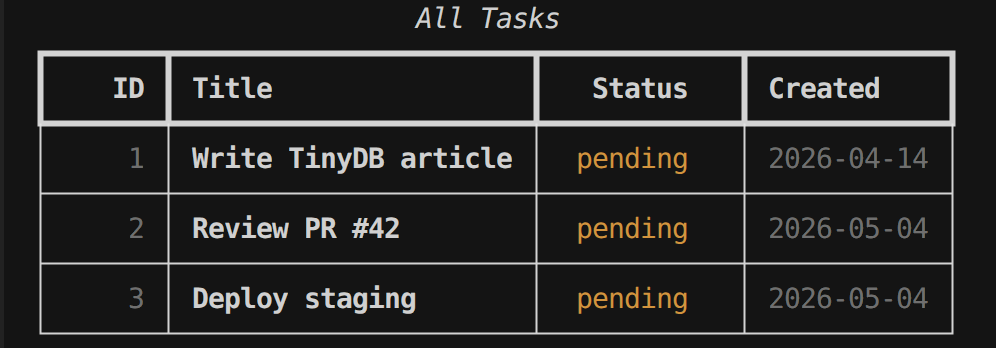
To make this tangible, here's how TinyDB works in a minimal CLI task manager, the kind of internal tool that actually gets built.
The full source code is in the companion GitHub repository:
 nunombispo
Opening the database and organizing data into tables:
# file: db.py

from pathlib import Path

from tinydb import TinyDB
from tinydb.storages import MemoryStorage

# Default path for the production database
DEFAULT_DB_PATH = Path.home() / ".task_manager" / "tasks.json"


def get_db(db_path: Path | None = None, in_memory: bool = False) -> TinyDB:
    if in_memory:
        return TinyDB(storage=MemoryStorage)

    path = db_path or DEFAULT_DB_PATH
    path.parent.mkdir(parents=True, exist_ok=True)
    return TinyDB(path)


def get_tables(db: TinyDB) -> tuple:
    tasks = db.table("tasks")
    notes = db.table("notes")
    return tasks, notes
Both tables live in a single tasks.json file. Open it and you see exactly what's stored:
{
  "tasks": {
    "1": {
      "title": "Write TinyDB article",
      "done": false,
      "created_at": "2026-04-14T08:28:41.294890"
    },
    "2": {
      "title": "Review PR #42",
      "done": false,
      "created_at": "2026-05-04T09:52:27.316977"
    }
  },
  "notes": {
    "1": {
      "task_id": 1,
      "text": "Check MemoryStorage in the TinyDB docs",
      "created_at": "2026-04-14T08:36:32.672970"
    }
  }
}
No binary formats. No opaque files. If something goes wrong, you can read the database with cat.
Inserting a document:
Each insert returns a doc_id, TinyDB's auto-assigned integer key. No schema to define first:
# file: models.py

def add_task(tasks: Table, title: str) -> int:
    doc_id = tasks.insert({
        "title": title,
        "done": False,
        "created_at": datetime.now().isoformat(),
    })
    return doc_id
Querying:
TinyDB's query interface is built around a Query object. Field conditions, regex matching, and logical operators are all supported:
# file: models.py

def get_pending_tasks(tasks: Table) -> list[Document]:
    Task = Query()
    return sorted(tasks.search(Task.done == False), key=lambda t: t.doc_id)

def get_done_tasks(tasks: Table) -> list[Document]:
    Task = Query()
    return sorted(tasks.search(Task.done == True), key=lambda t: t.doc_id)

def search_tasks(tasks: Table, keyword: str) -> list[Document]:
      Task = Query()
      return tasks.search(Task.title.matches(f".*{re.escape(keyword)}.*", flags=re.IGNORECASE))

def get_task(tasks: Table, task_id: int) -> Document | None:
    return tasks.get(doc_id=task_id)

def get_all_tasks(tasks: Table) -> list[Document]:
    return sorted(tasks.all(), key=lambda t: t.doc_id)
Updating and deleting:
Updates and deletes follow the same query pattern. Deleting a task cascades to its notes explicitly in code, TinyDB has no foreign key enforcement, so the application owns that logic: