How uv Resolves Dependencies So Fast (and Why pip Feels Slow)
If you have switched a project from pip to uv, you know the feeling: you run the command, blink, and it is already done. The usual explanation is “it’s written in Rust”. That is true, but it is not the interesting part. Plenty of Rust tools are slow, and plenty of Python tools are fast enough.
This article walks through uv the way you would read an unfamiliar codebase: how the resolver chooses versions, where wall-clock time is spent, what a lockfile records, and which steps pip still performs that uv can omit. The Watch it yourself section reproduces that path with uv lock -v on your own machine.
If you have not settled on a workflow yet, Forget pip and Poetry - uv Is the Future of Python Development covers the tool in more detail, and uv for Faster Teams, Fewer Environment Fires covers adoption across a team.
What a resolver has to solve
You list what you want in pyproject.toml, for example fastapi>=0.110 and pydantic>=2. Every package you add brings its own dependencies, and those bring more in turn. The resolver must choose one version of each package so nothing conflicts.
In theory that can explode into a combinatorial search (the same class of problem people call SAT). In practice, Python dependency resolution is usually tame. uv’s resolver docs spell out why:
- Picking versions newest-first often works without undoing earlier choices.
- An existing
uv.lockgives the resolver a head start: try those versions before exploring the index. - Reading what each version requires (metadata) costs more than the choosing logic, cache or not.
- A failed resolve should say which packages fought each other, not just “no solution”.
That is why uv uses a purpose-built incremental solver instead of a generic SAT engine, and why a slow uv lock is usually waiting on metadata rather than grinding through backtracking.
The solver loop: PubGrub
uv’s resolver is PubGrub (Rust port of the algorithm behind Dart’s package manager). The idea is simple: lock in one package version, pull in what it needs, move on. When two picks cannot live together, undo the last choice and try another branch.
Roughly, each round looks like this:
- Track what is already pinned and what is still open.
- Pick the next open package (by priority).
- Choose a version: locked versions first, otherwise try newer releases before older ones.
- Queue that version’s dependencies. uv prefetches their metadata while it continues solving.
- No clash? Continue. Clash? Backtrack.
The payoff is smart backtracking. Say the solver picks a 2, then b 2, but a 2 wants c 1 while b 2 wants c 2. There is no valid c. PubGrub blames the pair a 2 + b 2, remembers that pair as forbidden, backs up to a 2, and tries a different b without repeating the same mistake.
If nothing works, those forbidden pairs become the error text, so you see which packages disagree. uv can also swap the order of two troublemakers so the conflict shows up earlier next time.
PubGrub is good engineering. It is still not where most seconds go; fetching metadata is.
Where the time really goes: metadata
Before PubGrub can choose versions, it has to learn what each one depends on. That dependency lookup is usually slower than the choosing. uv works through a ladder, cheapest rung first:
- Tiny file on the index (PEP 658). PyPI can host a separate metadata file per wheel. uv reads that and never touches the wheel.
- A small slice of the wheel. Wheels are zip files. uv can request only the end of the file, find the
METADATArecord inside, and stop. - The full wheel. More data, still no build step.
- Build from source. Only when there is no usable wheel metadata: compile or run the package’s build backend to learn its dependencies.
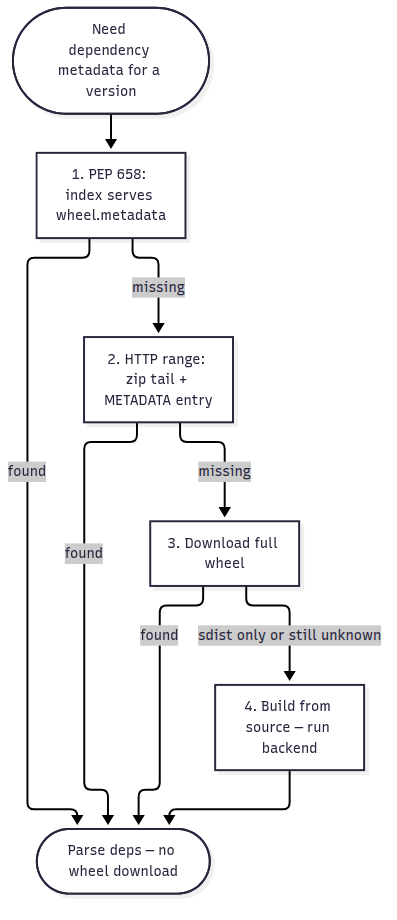
For most packages on PyPI, rungs one and two are enough. Full wheel downloads and source builds are the rare slow cases.
Your own app gets the same idea from PEP 621: list dependencies in pyproject.toml under [project], and uv reads them as text instead of running setup.py.
The ecosystem only caught up recently. Years ago, PEP 518 pointed out that discovering dependencies often meant executing setup.py. PyPI started serving PEP 658 metadata in May 2023; uv shipped in February 2024. Andrew Nesbitt’s write-up argues the same thing: the speed story is as much standards timing as it is Rust.
Inside uv, wheel metadata is parsed in the binary itself. Python subprocesses are for old packages that offer no other option. Version strings become compact integers for fast comparisons. Rust makes that cheaper; it does not remove the need for cheap metadata on the index.
Forking: one lockfile for every platform
In one active environment you get one version of each package. Yet your spec can ask for different versions in different situations:
numpy>=2,<3 ; python_version >= "3.11"
numpy>=1.16,<2 ; python_version < "3.11"
Those lines look contradictory until you notice the markers: on Python 3.11+ you use NumPy 2.x; below 3.11 you stay on 1.x. Only one line applies at install time.
uv’s forking resolver (the same idea Poetry uses) treats each marker combination as its own branch. It resolves each branch, then folds together branches that pick the same versions so uv.lock does not balloon. Branches can nest inside each other. The markers are environment markers in packaging terms.
One uv.lock can therefore cover Linux, macOS, Windows, and several Python versions. That reach applies to marker conditions, not to picking CPU-specific wheels (that is a separate wheel-tag story).
Your requires-python range is part of the contract too. If you declare >=3.9, the lock must be installable on 3.9 through whatever upper bound you imply. A dependency that demands Python 3.12 only cannot sneak in while you still advertise 3.9.
Verbose logs name the splits: Splitting resolution on ... and Solving split (markers: ...).
The lockfile: why the second run is almost free
uv.lock is the snapshot: exact version, hash, and download URL for every package. On the next uv lock, uv tries those pins first. Touch one dependency in pyproject.toml and it usually leaves the rest alone.
Forks need the same stability. Without saved splits, two runs could fork the graph differently just because packages were visited in another order. uv writes each branch’s resolution-markers into the lock so the next resolve reuses the same forks. Change requirements and you may add forks; otherwise the lock should not reshuffle.
The file sits beside pyproject.toml. Format is TOML: a small header, then a [[package]] block per dependency (versions, hashes, wheels, nested deps, and marker tables when you use forks). After uv add fastapi, a corner of the file looks like this:
version = 1
revision = 3
requires-python = ">=3.14"  # copied from [project]; yours matches pyproject.toml

[[package]]
name = "fastapi"
version = "0.162.5"
source = { registry = "https://pypi.org/simple" }
dependencies = [
    { name = "starlette" },
    { name = "pydantic" },
    # ...
]
wheels = [
    { url = "https://files.pythonhosted.org/packages/.../fastapi-0.162.5-py3-none-any.whl", hash = "sha256:...", size = 12345 },
]

[[package]]
name = "starlette"
version = "1.10.0"
# ...
Commit the file. uv sync --frozen installs what it lists, nothing more.
Handy commands:
uv lock                              # resolve and write uv.lock
uv lock --upgrade-package fastapi    # bump one package, leave the rest alone
uv lock --upgrade                    # ignore locked versions and re-resolve
uv lock --check                      # CI: fail if uv.lock is out of date
uv sync --frozen                     # CI: install from the lock without re-resolving
The install side: cache, links and parallelism
Locking picks versions. Installing still has to download wheels and put them in your venv.
pip typically copies every file into each new virtual environment. uv downloads once into a shared cache, then links those files into the venv (hardlinks, or copy-on-write where the filesystem allows). A second env with the same packages is mostly directory wiring, not another full copy. Find the cache with uv cache dir. If links misbehave on your volume, tune behavior with --link-mode.
uv also downloads several packages at once, where pip often worked one-by-one. During uv lock, prefetching metadata overlaps network I/O with solver work so the machine is less idle.
So why does pip feel slow?
pip is solid. It also has to keep behavior that made sense years ago. uv could skip a lot of that baggage.
- Runtime. pip is Python code on Python. uv is one binary that reads
pyproject.tomland wheel metadata directly. Old packages still force pip to spawn build tools just to learn dependencies. - Legacy surface. uv does not chase every historic format (eggs, pip’s own config files, loose metadata). pip still does.
- Indexes. With multiple indexes, pip may query all of them. uv stops at the first index that lists the package: fewer round trips, fewer dependency-confusion surprises.
- Install work. pip often downloads in a line and copies into each venv. uv caches once, links in, and fetches in parallel.
Andrew Nesbitt’s post makes a fair point: much of this is protocol and concurrency, not Rust. pip could adopt parts of it; breaking old workflows is the hard part.
uv’s trade-off is stricter. A borderline package may fail until the maintainer tightens metadata or you add an override.
Watch it yourself
Spin up a throwaway project and resolve it with logging on:
uv init demo && cd demo
uv add fastapi httpx sqlalchemy

# Re-resolve from scratch and watch the solver work
rm uv.lock
uv lock -v 2>&1 | grep -E "Selecting|Splitting|took|Found fresh response.*metadata"
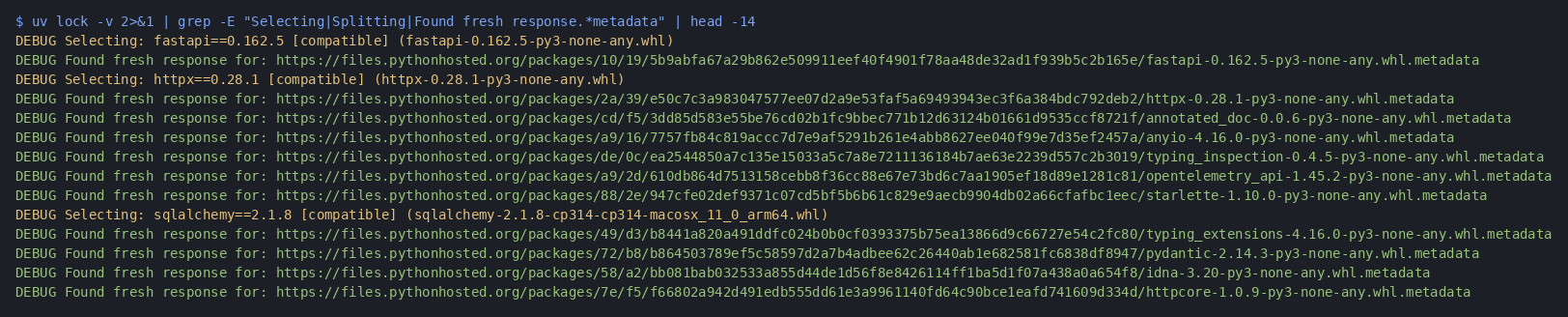
Verbose mode is noisy. The grep line keeps the interesting parts; omit it to see everything, or skip -v for the normal quiet run.
What to watch for:
Selecting ...— uv pinned another package version.Splitting resolution on .../Solving split (markers: ...)— a fork for different Python/OS markers.Found fresh response for: ...metadata— cheap metadata (index or cache), not a full wheel download.
From my machine after that demo:
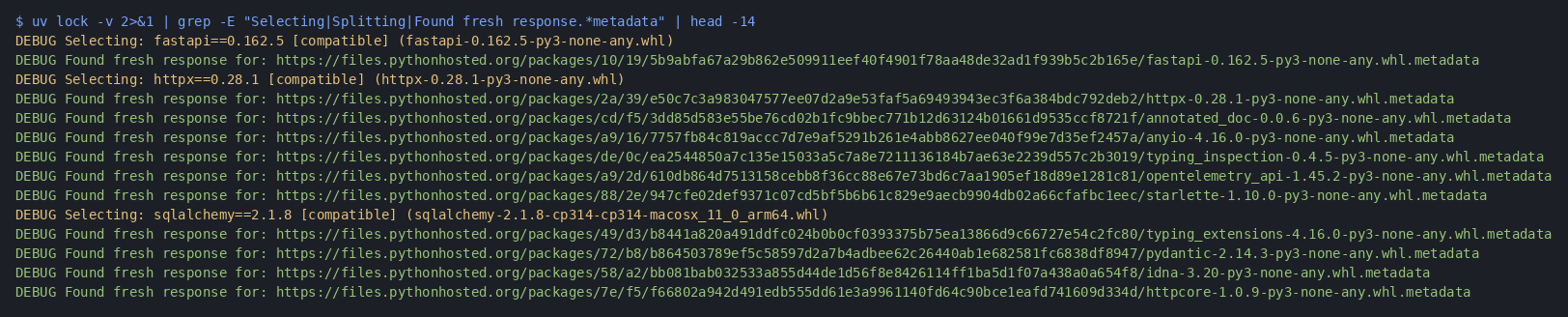
Your numbers will not match mine. Look for the rhythm: choose a version, read metadata (often from cache), repeat for each dependency.
To feel where time goes, empty the cache and time two locks back to back:
uv cache clean
rm uv.lock && time uv lock      # cold: hits the network for metadata
rm uv.lock && time uv lock      # warm: mostly reads the cache
The second run should be much quicker. That gap is mostly metadata, not PubGrub.
If you maintain a library and want to test whether your >= bounds are real, try:
uv lock --resolution lowest-direct
uv will lock your direct dependencies to the oldest versions your specs still allow.
Practical takeaways
- Write dependencies in
pyproject.tomlso uv reads TOML instead of running build hooks. - Commit
uv.lockso teammates and CI get the same versions, and the next lock stays fast. - Tighten
requires-pythonto the versions you really test; broader ranges mean more fork work. - In CI:
uv sync --frozento install the lock as written,uv lock --checkto catch a stale lock before merge. - Packages with no wheel still slow everyone down; prefer projects that publish wheels when you can.
For full pipeline recipes (GitHub Actions, GitLab CI, cache keys, Docker, and lock hygiene), see the uv for CI booklet.
uv got fast partly because PyPI finally exposes dependency metadata without downloading whole artifacts. pip benefits from the same PEP 658 files; uv simply started after those rules existed.
Follow me on Twitter: https://twitter.com/DevAsService
Follow me on Instagram: https://www.instagram.com/devasservice/
Follow me on TikTok: https://www.tiktok.com/@devasservice
Follow me on YouTube: https://www.youtube.com/@DevAsService



Comments ()